In partnership with the University Marketing and Communications department, University Technology ([U]Tech) at Case Western Reserve worked to redesign the appearance of the SSO display window.
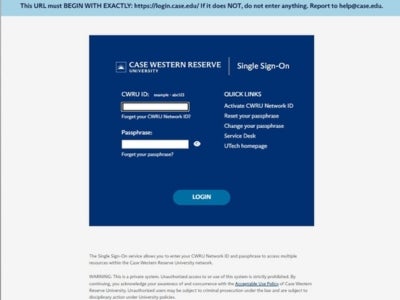
To align with the university’s branding goals, the familiar dog-ear box has been replaced by a simple squared off box. A banner has also been added as a reminder for the user to check that the URL displayed in the browser begins exactly with “https://login.case.edu” to help educate users to be on the lookout for credential phishing attempts.
Both changes are scheduled for deployment the week of July 16.
For assistance with any technology product or service at Case Western Reserve University, contact the University Technology Service Desk at help@case.edu or 216.368.HELP (4357) or visit help.case.edu.